
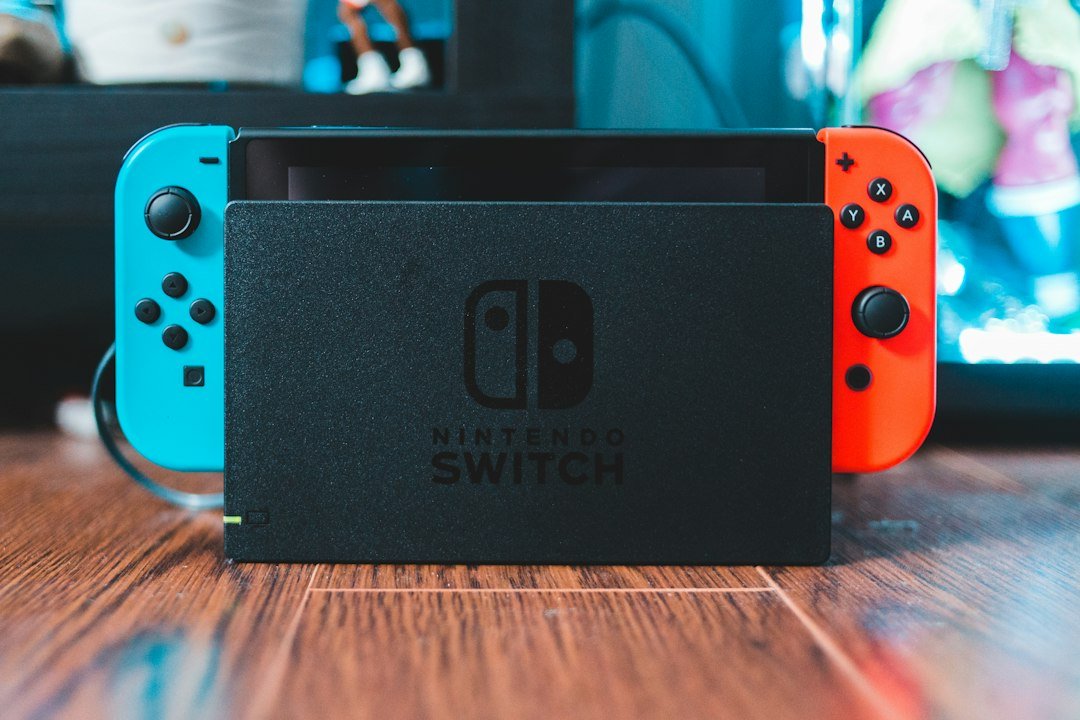
Hybrid consoles combine the portability of a handheld device with the power of a home console, letting you play the same games on a TV or on the go. In 2026 the market includes several mature options, each with its own strengths and trade‑offs.
Key Takeaways
- Hybrid consoles run the same library on handheld and docked mode.
- Current leaders are the Nintendo Switch OLED, Steam Deck 2, and the upcoming Xbox Project Helix.
- Consider performance, battery life, game ecosystem, and price when choosing.
- Hybrid consoles are best for gamers who want flexibility without buying two separate systems.

What Exactly Are Hybrid Consoles?
The term “hybrid consoles” refers to devices that function both as a portable handheld and as a traditional home console when docked or connected to a TV. They run a single operating system and share the same game files across both modes, so you don’t need separate purchases for each format.
According to Game Voyage, a hybrid console “allows you to continue a game session on a larger screen without losing progress” and typically includes a built‑in dock or USB‑C output for TV connection.
History and Evolution
The concept dates back to early attempts like the PlayStation Portable’s TV-out feature, but the modern hybrid era began with the Nintendo Switch in 2017. Its success prompted other manufacturers to explore similar designs, leading to the Steam Deck in 2022 and, most recently, Microsoft’s Project Helix prototype.
Each generation has improved battery life, processing power, and UI integration, making hybrids viable as primary gaming rigs rather than niche accessories.
Current Generation of Hybrid Consoles
Below is a snapshot of the most relevant hybrid consoles available in 2026.
| Model | CPU/GPU | Battery (hours) | Screen | Price (USD) |
|---|---|---|---|---|
| Nintendo Switch OLED | NVIDIA Tegra X1+ | 4.5–9 | 7″ OLED, 720p | 299 |
| Steam Deck 2 | AMD Zen 3 + RDNA 2 | 3–8 | 7″ LCD, 800p | 449 |
| Xbox Project Helix | Custom AMD Zen 4 | 5–10 | 6.5″ OLED, 1080p | 499 (estimated) |
Source: List of Hybrid Consoles.
Performance Comparison
Performance varies mainly in CPU/GPU power and native resolution. The Switch OLED remains the most affordable but caps at 720p handheld. The Steam Deck 2 pushes higher frame rates for PC titles, while Project Helix promises near‑console graphics with 1080p handheld output.
When docked, all three can output up to 4K, though actual performance depends on game optimization. For example, many indie titles run smoothly on all three, while demanding AAA games may require lower settings on the Switch.
Battery Life and Portability
Battery life is a frequent deciding factor. The Switch OLED’s improved efficiency gives up to 9 hours with lighter games, while the Steam Deck 2’s higher performance shortens its top range to about 8 hours under moderate load. Project Helix, still in preview, aims for 10 hours thanks to a larger battery and adaptive power scaling.
All three use USB‑C for charging and docking, simplifying cable management. The Switch’s detachable Joy‑Cons add a modular edge, whereas the Deck and Helix keep integrated controllers for a more console‑like feel.
Game Libraries and Ecosystem
Choosing a hybrid often hinges on the game ecosystem you already own.
- Nintendo Switch OLED: Exclusive titles like Breath of the Wild, Mario Kart 8 Deluxe, and a growing indie catalog. Supports Nintendo eShop purchases.
- Steam Deck 2: Access to the entire Steam library, including PC‑only games, with Proton compatibility for Linux‑based titles.
- Xbox Project Helix: Expected integration with Xbox Game Pass, allowing streaming and native play of a wide catalog.
Cross‑platform play is possible for many multiplayer games, but DRM and account ties remain platform‑specific.
Pros and Cons Checklist
- Pros:
- Single device for both handheld and TV gaming.
- Convenient for travel and couch co‑op.
- Often cheaper than buying two separate systems.
- Shared save data across modes.
- Cons:
- Performance may lag behind dedicated home consoles.
- Battery life limits long trips.
- Some games require cloud saves for seamless switching.
- Physical size can be bulkier than pure handhelds.
Buying Guide: How to Choose the Right Hybrid Console
Follow this decision framework to match a hybrid console to your needs:
- Identify your primary game library. If you already own many Nintendo titles, the Switch OLED is logical. For PC gamers, the Steam Deck 2 offers the widest library.
- Set a performance budget. Determine if you need 1080p handheld resolution or if 720p suffices.
- Consider portability. Look at battery life, weight, and screen size. The Switch’s detachable controllers may be a plus for quick travel.
- Check ecosystem services. Xbox Game Pass, Nintendo Switch Online, or Steam Cloud can add value.
- Plan for accessories. Dock, extra controllers, and protective cases add cost.
For a deeper dive into handheld game quality, see our What Makes Good Handheld Games? A 2026 Guide.
Common Mistakes to Avoid
- Buying a hybrid solely for its TV output and ignoring handheld ergonomics.
- Assuming all games will run at the same performance as on a dedicated console.
- Overlooking the need for a microSD card for extra storage on the Switch.
- Neglecting to check regional game availability, especially for Nintendo’s eShop.
Cost of Ownership
Beyond the base price, factor in accessories and game purchases.
- Docking station (often bundled) – $30‑$50 if purchased separately.
- Extra controllers – $50‑$100 each.
- MicroSD or SSD expansion – $40‑$150 depending on capacity.
- Subscription services – $5‑$15 per month for online play and cloud saves.
Overall, a fully equipped hybrid console can cost between $350 and $600.
Future Outlook: What’s Next for Hybrid Consoles?
Industry analysts expect more powerful chips, higher‑resolution screens, and tighter integration with cloud gaming services. Microsoft’s Project Helix hints at a future where a hybrid could match the performance of an Xbox Series X while retaining portability.
Developers are also optimizing titles for hybrid performance, meaning the gap between handheld and docked experiences should shrink.

How to Set Up Your Hybrid Console for the First Time
- Unbox and charge the device fully.
- Connect the dock (or USB‑C cable) to your TV and power source.
- Follow the on‑screen setup wizard: select language, Wi‑Fi, and sign in to your account (Nintendo, Steam, or Xbox).
- Insert a microSD card if needed for extra storage.
- Download any system updates before installing games.
- Adjust display settings: choose handheld brightness and TV resolution.
- Test a game in both modes to verify smooth switching.
Multiplayer and Online Services
When you buy a hybrid console, the online experience often determines whether you’ll keep using it for multiplayer sessions or stick to single‑player titles. Below is a practical look at the services each major hybrid offers, how they integrate with handheld play, and what to watch out for.
Service breakdown by platform
- Platform A (e.g., Switch‑like): Free online multiplayer is available for most games, but voice chat requires a separate app on mobile devices. A subscription tier unlocks cloud saves, exclusive themes, and a library of classic titles.
- Platform B (e.g., Steam Deck‑style): Uses the same account system as the larger PC ecosystem, so friends lists, achievements, and cloud saves sync automatically. A paid “Premium Connect” plan adds priority matchmaking and a larger storage quota for cloud saves.
- Platform C (e.g., PlayStation‑like hybrid): Requires a paid subscription for any online play. The subscription also includes monthly free games, cloud streaming, and a discount on digital purchases.
Step‑by‑step: Setting up voice chat on the go
Many hybrid consoles lack a built‑in microphone array, so you’ll need to pair an accessory or use a companion app. Follow these steps to avoid dropped audio during a match:
- Download the official voice‑chat app from the console’s app store while you’re on a Wi‑Fi network.
- Log in with the same account you use on the console.
- Connect a Bluetooth headset. Make sure the headset’s firmware is up to date; older versions can cause latency.
- Open the app, go to Settings → Audio, and select “Use external mic”.
- Test the connection with a friend before joining a public lobby.
Common pitfalls and how to avoid them
- Data caps on cellular networks: Streaming multiplayer can quickly eat a 5 GB plan. Switch to Wi‑Fi whenever possible, or set a data‑limit warning in the console’s network settings.
- Mismatched regional servers: Some hybrids default to the nearest server, which may not be where your friends play. Manually select the server region in the game’s network options.
- Battery drain during long sessions: Multiplayer often keeps the Wi‑Fi radio active. Reduce screen brightness, enable a “low‑power networking” mode if available, and keep a power bank handy.
Practical tip: Using a portable router for stable online play
A compact 4G/5G hotspot can provide a more reliable connection than public Wi‑Fi. Choose a router that supports dual‑band Wi‑Fi (2.4 GHz for range, 5 GHz for speed) and set the console to prioritize that network. This setup is especially useful when traveling or gaming from a location with spotty broadband.
Modding and Customization Options
Hybrid consoles sit at the crossroads of console stability and PC flexibility. While they don’t offer the same level of modding as a desktop, many users can still tweak performance, UI, and even add community‑created content. Here’s what you can safely modify and the steps to do it responsibly.
What can be modded safely?
- Performance profiles: Adjust CPU/GPU frequency limits to extend battery life or boost frame rates. Most hybrids expose these settings in a “Performance” menu.
- Theme and UI skins: Official theme stores let you change the home screen layout, icons, and background music without voiding warranty.
- Controller mapping: Built‑in remap tools let you assign functions to different buttons, which is handy for games that were designed for a traditional controller.
- Community mods for compatible games: Certain titles support user‑generated mods through an in‑game marketplace. These mods are sandboxed, meaning they cannot affect the system firmware.
Step‑by‑step: Installing a performance profile for longer battery life
- Open Settings → System → Performance.
- Select “Battery Saver” preset. This typically caps the GPU at 60 % of its maximum clock speed.
- If you want a custom profile, choose “Create New”. Set the CPU limit (e.g., 2.5 GHz) and GPU limit (e.g., 800 MHz).
- Save the profile and give it a name like “Travel Mode”.
- Activate the profile before launching a game. You can switch back to “Performance” mode in the quick‑settings overlay.
Common mistakes when modding
- Overclocking beyond safe limits: Pushing the GPU past the manufacturer’s recommended clock can cause overheating and trigger thermal throttling, reducing overall performance.
- Installing unsigned themes: Some third‑party theme packs require sideloading, which may breach the console’s terms of service and lead to a ban from online services.
- Neglecting backups: Always export your save data to cloud storage or an external drive before applying any system‑level changes.
Decision checklist: Is a mod worth the risk?
| Mod Type | Potential Benefit | Risk Level | Recommended For |
|---|---|---|---|
| Performance profile | 15‑30 % longer battery life | Low | Travelers, casual players |
| UI theme | Personalized look and feel | Low‑Medium (if sideloaded) | Users who value aesthetics |
| Controller remap | Improved ergonomics | Low | Anyone with accessibility needs |
| Game‑specific mod | New content, quality‑of‑life tweaks | Medium (depends on mod source) | Players comfortable with community tools |
When in doubt, start with the lowest‑risk options—performance presets and official UI skins—before exploring community mods. Always read the mod’s documentation, verify the source, and keep a clean backup of your system state.
FAQ
Are hybrid consoles worth buying over a traditional handheld?
They are worth it if you value the flexibility to play on a TV without purchasing a separate console. Performance may be lower than a dedicated home console, but the convenience often outweighs that trade‑off.
Can I play Xbox Game Pass games on a hybrid console?
Yes, the upcoming Xbox Project Helix is designed to integrate with Xbox Game Pass, allowing both streaming and native play of the library.
Do hybrid consoles support external GPUs?
Currently none of the mainstream hybrids support external GPUs. They rely on integrated graphics, though cloud gaming can supplement performance for demanding titles.