
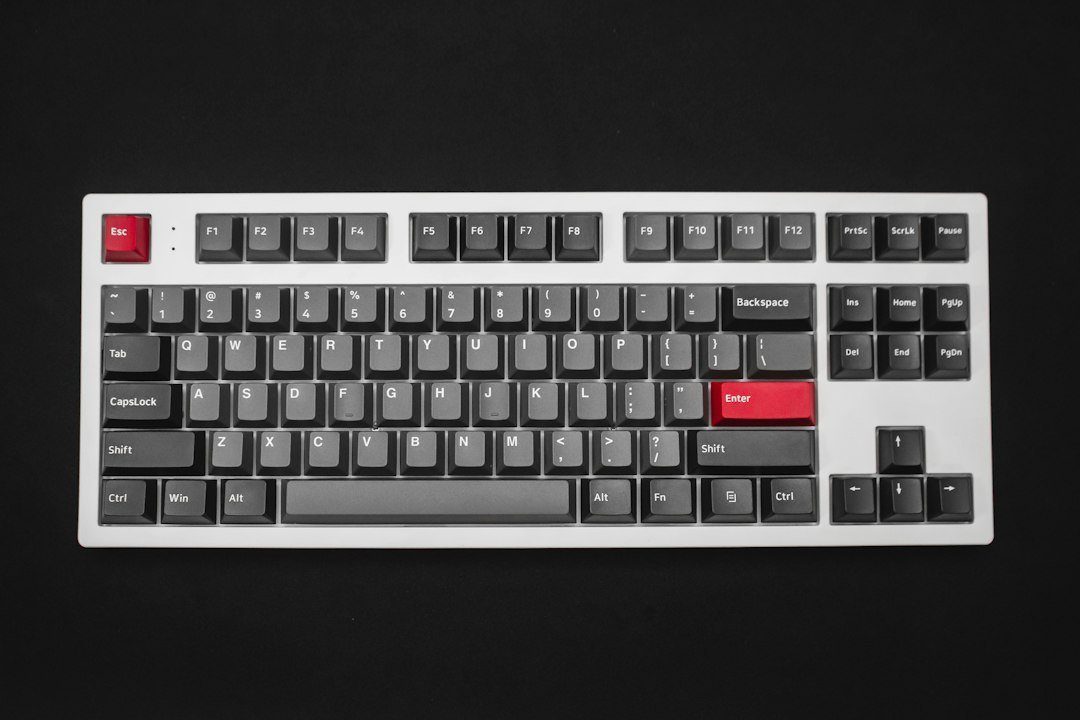
A full size mechanical keyboard gives you the classic 104‑key layout plus a dedicated number pad, which many gamers and typists prefer for its familiarity and extra keys.
Try it now: keyboard tester
Key Takeaways
- Pick a switch type that matches your play style – tactile for control, linear for speed.
- Check build quality: aluminum case, plate, and stabilizers matter for durability.
- Use the free keyboard tester first to verify every key works before buying.
- Consider extra features – RGB, macro keys, detachable cable – only if they add real value.
- Set a budget and compare specs; you don’t need a premium price for a solid experience.

What makes a full size mechanical keyboard different?
Full size keyboards keep the full 104‑key layout (or 108 with Windows keys). That means you have a separate number pad, function row, navigation cluster, and full arrow keys. The layout is useful for games that bind actions to the numpad, spreadsheets, or anyone who types a lot of numbers.
If you only need the main block, a tenkeyless (TKL) or 96% board can save desk space, but a full size board eliminates the need to reach for a separate numeric keypad.
How to choose the right switch type
Switches are the heart of a mechanical keyboard. Three main families dominate the market:
- Tactile – a bump you feel when the actuation point is reached (e.g., Cherry MX Brown). Good for mixed typing and gaming because you get feedback without a loud click.
- Linear – smooth travel with no bump (e.g., Cherry MX Red). Preferred by fast‑click gamers who want minimal resistance.
- Clicky – an audible click at actuation (e.g., Cherry MX Blue). Great for typing satisfaction but can be noisy in a shared space.
Try each style with the keyboard tester if you have a friend’s board, or visit a local store to feel the difference before committing.

Build quality and durability factors
Even the best switches won’t last if the chassis is flimsy. Look for these cues:
- Case material: Aluminum or high‑grade plastic reduces flex.
- Plate: Steel or brass plates give a solid feel and improve acoustics.
- Stabilizers: Screw‑in or lubed stabilizers prevent rattling on larger keys like the spacebar and enter.
- Keycap profile: PBT keycaps resist shine; ABS caps feel smoother but wear faster.
Check product reviews for reports of key chatter or wobble. If you’re buying a budget board, a simple DIY lubing of stabilizers can dramatically improve feel.
Features that actually matter for gamers
Manufacturers love to add flashy extras, but not all are useful:
- RGB lighting: Pure aesthetic. It won’t affect performance, but a well‑programmed lighting layer can highlight macro keys.
- Macro keys: Helpful for MMO or RTS shortcuts; make sure the software is cross‑platform if you switch between Windows and Linux.
- Detachable USB‑C cable: Easier to transport and reduces wear on the port.
- Hot‑swap sockets: Allow you to change switches without soldering – great for experimenters.
If you rarely use macros and prefer a clean desk, you can skip RGB and still get a high‑performing board.
How to test a keyboard before you buy
The safest way to avoid dead keys or mis‑registered inputs is to use a free online keyboard tester. It shows the name and code of every key you press, so you can quickly spot any non‑responsive or double‑registering keys.
Steps:
- Open the keyboard tester in your browser.
- Press each key, especially the ones you use most in games (WASD, space, number pad).
- Watch the on‑screen output; any missing codes indicate a dead or stuck key.
- Note the response time if the tool provides it – a delay of more than a few milliseconds can affect high‑CPS games.
If you’re buying a pre‑built board, you can still run the test on a friend’s unit or a demo model at a store.
Decision checklist – is this the right full size mechanical keyboard for you?
| Criteria | Yes? | Notes |
|---|---|---|
| Need a numeric keypad for games or work? | Yes/No | Full size solves it; otherwise consider 96%. |
| Preferred switch feel (tactile, linear, clicky)? | Yes/No | Match to your play style. |
| Budget under $150? | Yes/No | Many solid options exist under this price. |
| Require detachable cable or hot‑swap? | Yes/No | Only if you travel or want to change switches. |
| Will you use macros heavily? | Yes/No | Look for dedicated macro keys or software support. |
Answering “yes” to the rows that matter to you narrows the field quickly.
Top recommended full size mechanical keyboards (2026)
Based on the latest listings from reputable retailers, these models balance price, build quality, and switch variety:
- Keychron K10 – Gateron optical switches, aluminum frame, hot‑swap option.
- Logitech G915 TKL (full‑size variant) – low‑profile linear switches, detachable USB‑C.
- Ducky One 2 RGB – Cherry MX Brown or Red, PBT keycaps, solid plastic case.
- Razer BlackWidow V4 – Razer Green clicky switches, full‑size layout, extensive RGB.
- SteelSeries Apex Pro – Adjustable actuation switches, aluminum case, premium price.
All of these appear in the full‑size keyboards collection and the KeebFinder filter for quick comparison.
Common mistakes and how to avoid them
Buying for looks alone. A board that shines in photos may have cheap plastic or noisy switches that hurt your game performance.
Skipping the switch test. Even within the same switch family, tolerances differ. Use a tester or demo to confirm the feel.
Ignoring key rollover. For fast CPS games, you need at least 6‑key rollover (NKRO) so multiple keys register simultaneously. Most modern full size boards have full NKRO, but verify in the specs.
Overpaying for unnecessary features. If you never use macros, a macro‑heavy board is wasteful money.
How to maintain your full size mechanical keyboard
Regular care extends lifespan:
- Remove keycaps once a month and brush out dust.
- Use a compressed‑air can to clear debris from switches.
- Apply a thin layer of switch lubricant to tactile or linear switches if you notice scratchiness.
- Wipe the case with a slightly damp microfiber cloth; avoid harsh chemicals.
Keeping the board clean prevents sticky keys that could affect your click speed tests.
What to do next
1. Run the free keyboard tester on your current keyboard to spot any dead keys.
2. List the switch type and features you need using the decision checklist above.
3. Compare the shortlisted models on the external retailer pages, then make your purchase.
Which keycap material gives the best feel for gaming?
Keycaps aren’t just about looks; the material influences tactile feedback, sound, and how quickly your fingers can move. For most gamers, the sweet spot is a double‑shot PBT keycap set. It resists shine, feels slightly textured, and produces a muted “thock” that doesn’t drown out in‑game audio.
Why PBT often beats ABS
- Durability: PBT doesn’t develop the glossy finish that ABS gets after weeks of rapid key presses.
- Consistency: The texture stays uniform, so you won’t notice a sudden change in grip halfway across the board.
- Sound profile: PBT’s denser composition dampens the high‑pitched ping that can be distracting during intense matches.
When ABS might still work
If you prefer a lighter key feel or need a very tight budget, ABS caps are cheaper and come in a wider range of colors. Just be aware they can become slick and develop a “shiny” look after heavy use.
Step‑by‑step: swapping a keycap set
- Remove the keycaps with a pull‑er, starting with the larger keys (Enter, Shift, Space).
- Check the stabilizers; if they’re loose, gently snap them back into place before installing new caps.
- Align each new cap with its stem (most are cross‑shaped) and press down until you feel it click.
- Test a few keys to ensure they sit level; uneven caps can affect typing speed.
Doing this once a year keeps the keyboard feeling fresh and can even improve your reaction times by reducing finger slip.
How to evaluate latency and polling rate on a full size keyboard
Latency is the delay between a key press and the signal reaching your PC. Polling rate is how often the keyboard reports its state, measured in Hz. For competitive gamers, a low latency (<1 ms) and a high polling rate (1000 Hz) are ideal, but the real‑world impact varies by game and setup.
Understanding the numbers
- Latency: Measured in milliseconds; the lower, the better. Most wired mechanical keyboards sit around 0.5–2 ms.
- Polling rate: 125 Hz means the keyboard reports 125 times per second (every 8 ms). 1000 Hz updates every 1 ms, shaving off a few milliseconds of delay.
Practical test without special equipment
- Open a plain text editor and place the cursor at the start of a new line.
- Press a key repeatedly while a friend watches the screen for any lag in character appearance.
- If you notice a noticeable gap between fast keystrokes, the keyboard may be throttling its polling rate.
This simple visual check catches the most egregious latency issues without a USB‑logic analyzer.
When a higher polling rate matters
Fast‑paced shooters (e.g., battle royales) benefit the most because every millisecond counts for rapid fire or quick directional changes. In slower strategy games, the difference is negligible, so you can prioritize other features like switch feel or macro support.
Decision rule
If you play competitive FPS titles and use a wired connection, aim for a keyboard that advertises 1000 Hz polling and latency under 1 ms. If you mainly play RPGs or use the keyboard for both gaming and typing, a 500 Hz polling rate with sub‑2 ms latency is sufficient and often comes at a lower price.
Balancing RGB lighting with performance: does it really affect gameplay?
RGB lighting looks great, but does it slow down a keyboard? In most modern full size keyboards, the lighting controller runs on a separate microcontroller, so the impact on key registration is minimal. However, certain edge cases can introduce hiccups.
Potential pitfalls
- Power draw: On USB‑C ports that limit power to 500 mA, extremely bright per‑key lighting can cause the keyboard to throttle its USB bandwidth, leading to occasional missed keystrokes.
- Firmware conflicts: Some budget models bundle lighting and input firmware together; a heavy lighting effect (rainbow wave) may cause a brief lag when the CPU switches contexts.
- Software overhead: Using a third‑party lighting app that constantly polls the keyboard can add a few milliseconds of latency on low‑end PCs.
How to keep lighting from interfering
- Choose a keyboard with a dedicated lighting chip (often listed as “RGB controller” in specs).
- Set the lighting mode to a static color or a low‑frequency effect during competitive play.
- Close the lighting configuration software when you launch a game that requires the lowest possible input lag.
Practical tip: creating a gaming profile
Most RGB software lets you save profiles. Create one named “Game” that disables fancy effects and lowers brightness to 30‑40 %. Switch to this profile with a single key press before you start a match. You’ll retain the visual flair for casual play while ensuring performance stays sharp.
When to skip RGB altogether
If you’re using a laptop with limited USB power or you’ve experienced occasional missed inputs, opting for a keyboard without per‑key RGB eliminates the variable entirely. A solid‑tone backlight (single color) still offers visibility in low‑light rooms without the extra complexity.
FAQ
Do full size mechanical keyboards have higher latency than tenkeyless models?
Latency is mainly determined by the PCB and firmware, not the size of the board. Most modern full size keyboards have sub‑1 ms polling rates, similar to TKL models.
Can I use a full size mechanical keyboard for esports titles that require fast CPS?
Yes, as long as the board offers full NKRO and a linear switch you’re comfortable with. Test your CPS with our click counter after you’ve set up the keyboard.
Is a detachable USB‑C cable worth the extra cost?
If you travel often or frequently plug and unplug the board, a detachable cable reduces wear on the port and makes packing easier. Otherwise, a fixed cable works fine.